
December 11 is National App Day, a perfect excuse to talk about the technology that is de facto changing lives, not just cluttering our home screens.
For people who are blind, low vision and visually impaired, the right app isn’t just a convenience; it’s a differentiator for achieving autonomy and workplace independence. Whether it’s navigating a new office environment, reading a business card, or troubleshooting a computer screen, technology is helping people who are blind, become less reliant on human sighted assistance.
Artificial intelligence (AI) has completely rewritten the paradigm. We’ve moved past simple text readers into an era where apps can now understand context, describe complex scenes, and answer specific questions about your surroundings.
Here are six AI-powered smartphone apps that continue to lead the way in helping people make the shift to greater personal independence:
1. Seeing AI
If you’ve been in the accessibility space for a while, you know Seeing AI. Microsoft’s free app is essentially a Swiss Army knife for daily tasks. It reads printed text instantly, identifies products by their barcode, describes people nearby, and can even guide you to the door of a building using audio cues. It is fast, reliable, and for many, the first app opened in the morning.
Download Links:
2. PiccyBot
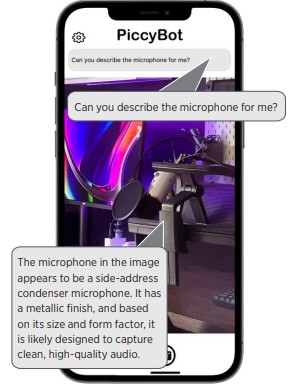
PiccyBot turns visual descriptions into a personality-infused conversation. Instead of just getting a static description of a photo or video, you can chat with an expressive, serious, or happy AI personality about it. Snap a picture, and ask PiccyBot’s “fashionable” personality specific details: Which tie looks best with this shirt and suit? What are the people doing in this video? It allows for a level of both detail and nuance that standard description solutions often miss, giving users astonishing detail, right down to explaining a video slowly pans from left to right, even picking up the auditory cues of singing birds and rustling tree leaves in the background.
Download Links:
3. Ally
Ally is a conversational AI assistant designed to help you navigate the web and get answers quickly. Rather than sifting through visual search results or complex menus, you can simply ask Ally questions in natural language. Whether you want to know if you should take an umbrella with you before heading to work in the morning, want Ally to find specific online information for you, or help you organize your thoughts or calendar, Ally acts as a smart, text-based companion that streamlines digital tasks without the visual clutter. If you have a distaste for peppers and onions, Ally will remember when you ask it to read subsequent restaurant menus, informing you which dishes you would like best or dislike based on the dish’s ingredients and Ally’s recall of your original taste preferences.
Download Links:
4. Be My AI (inside Be My Eyes)
Be My Eyes has always been the go-to for connecting with sighted volunteers. But their newest feature, Be My AI, is a game-changer when you prefer not to speak with a live sighted volunteer. Powered by ChatGPT through Be My Eye’s unique relationship with OpenAI, you can snap a photo of anything—a refrigerator shelf, a complex sales chart, a restaurant sign—and get a stunningly detailed description. You can then ask follow-up questions like, “What is my dining bill total? What is 18 percent?” or “How do I reboot this laptop based on the screen?” It’s fast, private, and, since it uses Open AI’s latest language model, incredibly smart.
Download Links:
5. Aira (Access AI)
Aira is best known for connecting users to professional, trusted human visual interpreters. However, they recently introduced Access AI. This feature lets users take photos and receive an instant AI description for free. The “magic” trick here is the verification: if the AI description doesn’t make sense or feels incomplete, you can tap a button to have a trained human agent verify and correct the description instantly. It combines the speed of AI with the trust of human judgment.
Download Links:
6. Meta AI (with Ray-Ban Meta Smart Glasses)
This is where software meets wearable assistive hardware that is actually fashionable. When paired with Ray-Ban Meta smart glasses, the Meta AI app allows hands-free assistance. You can simply say, “Hey Meta, read this whiteboard”; “Hey Meta, look and summarize this meeting handout”; or “Hey Meta, describe this pie chart, including colors.” Because the camera is on your face, it provides a point-of-view description that feels much more natural than holding up a phone. It’s a glimpse into the future of totally discrete-looking, wearable accessibility.
Download Links:
More Than Algorithms
Every download of these six apps represents a step toward greater autonomy. These tools make workplaces more navigable and daily tasks less of a hassle. But more importantly, they prove that accessibility and innovation are the same thing.
At NSITE and National Industries for the Blind (NIB), we champion this evolution every day. By supporting accessible tools and creating pathways to meaningful employment, we’re helping people who are blind build careers and thrive in a tech-driven world.
This National App Day, download something new, give it a try, and see how far today’s technology will take you.